
Create a video object

Creates a video object. More information on video objects can be found here.

Recent Requests
Log in to see full request history
TimeStatusUser Agent
Retrieving recent requests…
LoadingLoading…

Creating a video object

A video object is just an empty shell for the actual video you are going to upload. You can find a visual representation below:
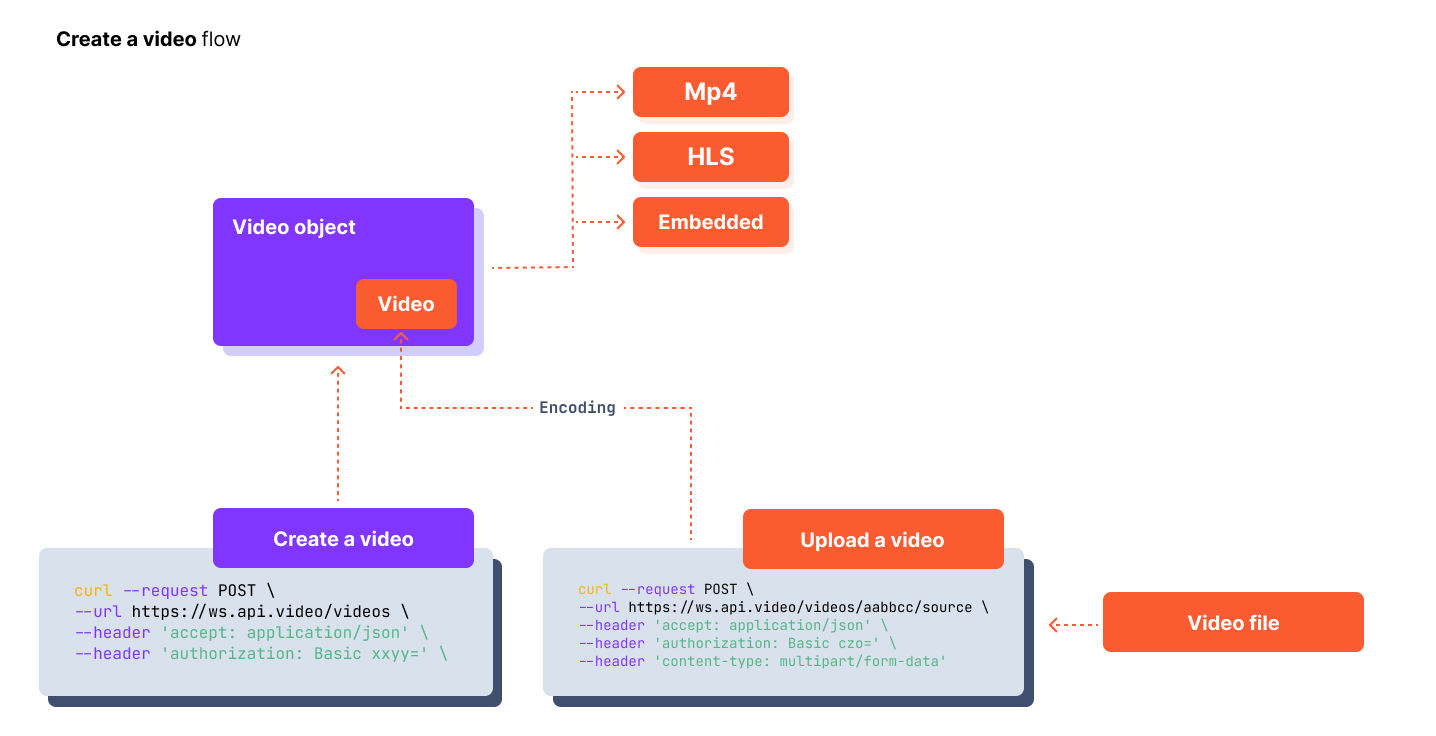
1436
Body Params

video to create

string
required

The title of your new video.

string

A brief description of your video.

string

You can either add a video already on the web, by entering the URL of the video, or you can also enter the videoId of one of the videos you already have on your api.video acccount, and this will generate a copy of your video. Creating a copy of a video can be especially useful if you want to keep your original video and trim or apply a watermark onto the copy you would create.

boolean
Defaults to true

Default: True. If set to false the video will become private. More information on private videos can be found here

boolean
Defaults to false

Indicates if your video is a 360/immersive video.

boolean
Defaults to true

Enables mp4 version in addition to streamed version.

string

The unique identification number for your video player.

tags
array of strings

A list of tags you want to use to describe your video.

tags
metadata
array of objects

A list of key value pairs that you use to provide metadata for your video. These pairs can be made dynamic, allowing you to segment your audience. Read more on dynamic metadata.

metadata
clip
object
watermark
object
Responses

Language
Credentials
Basic
base64
:
URL
LoadingLoading…
Response
Click Try It! to start a request and see the response here! Or choose an example:
application/json